

Disclaimer: This post contains affiliate links. If you sign up for Pressable through them, I may earn a commission at no extra cost to you. I tested everything below on my own paid account with my own money — nobody reviewed or approved this writeup before it went live.
TL;DR: Pressable MCP lets you manage your WordPress hosting by typing plain English to Claude (or ChatGPT/Gemini) instead of clicking the dashboard. I connected it to my own account and timed five real jobs both ways. Creating a site was about 4× faster through Claude (~13s vs ~56s). Cloning, backups, and log checks were faster too. It is free on every plan, still in public beta, and has rough edges I will show you.
I run more than one WordPress site on my own, and I build plugins, so I spend a lot of my week inside hosting dashboards doing the same boring jobs — spin up a site, clone it to staging, bump PHP, take a backup, read the error log. When Pressable shipped an MCP integration that claims to do all of this through an AI chat, I did not want to take their word for it. I connected it to a real account and put a stopwatch on it.
What is Pressable MCP, in plain words?
MCP stands for Model Context Protocol. It is an open standard that lets an AI assistant actually do things in an outside service, not just chat about them. Pressable built an MCP server for its hosting platform. Once you connect it, you can tell Claude “create a staging copy of my site and bump it to PHP 8.4” and it goes and does it on your real account.
It works with Claude (Desktop and Code), ChatGPT, and Gemini CLI. Setup is one terminal command for Claude Code — you generate an access token in your Pressable dashboard, paste it into one claude mcp add command, and it connects. It is included free on every Pressable plan, with no add-on fee. As of June 2026 it is still labelled public beta, which matters — I will come back to that.
How I tested it (and why you can trust the numbers)
I signed up for the cheapest plan, Signature 1 Monthly, so this is a single-site account — one production site, plus staging and sandbox environments that do not count against the limit. I connected the Pressable MCP to Claude on my own machine, then ran the same five jobs two ways: once by clicking through the MyPressable dashboard myself, and once by asking Claude in plain English. I timestamped every step.
One honest note on method: the “via Claude” times include the few seconds the assistant takes to think and respond, so they are real-world numbers, not raw API latency. The dashboard times are me actually navigating the UI. Both are measured the same way, so the comparison is fair. The trial coupon made the first month genuinely free — here is the checkout, so you know I am not guessing at pricing.

The results: Claude vs the dashboard
Here is the full scoreboard from my test on 17 May 2026. These are operator times — how long you spend doing the job, not the backend provisioning, which is identical either way because it is the same Pressable infrastructure.
| Task | Via Claude (MCP) | Via dashboard | Notes |
|---|---|---|---|
| Create a site | ~13 sec | ~56 sec | 3-step wizard vs one sentence |
| Clone to staging | ~15 sec | ~22 sec + 2–3 min lock | dashboard locked after a clone; MCP was not |
| Change PHP version | instant, one line | ~27 sec | roughly a tie on one site |
| On-demand backup | ~8 sec | ~22 sec | same ~60 sec backend either way |
| Pull PHP error logs | ~8 sec | ~22 sec | MCP returns structured, filterable data |
The pattern is consistent: the AI route removes navigation entirely, so it wins on operator effort every time. But notice I am not claiming it is 10× faster at everything — for one quick setting on one site it is barely faster. I will be straight about that below, because that honesty is the whole point.
How fast is creating a site with Pressable MCP?
This was the clearest win. Through the dashboard, creating a site is a three-step wizard: pick the owner, pick the site type, then fill in name, PHP version, and datacenter. From opening the create page to reaching the final button took me about 56 seconds.
Through Claude, I typed one sentence. It validated the name, created the site with PHP 8.3 in the Dallas datacenter, and handed back the new site ID in about 13 seconds of my time. The site itself then provisioned in the background in a minute or two — exactly the same as the dashboard, because it is the same backend. The difference is purely how much of your attention it costs. Here is the wizard you skip:

Cloning production to staging: where the dashboard tripped
Asking Claude to clone my production site to a staging copy took about 15 seconds of my time, and the clone went live in a couple of minutes. Then I tried the same thing in the dashboard — and hit a real beta annoyance worth knowing about.
The dashboard’s “Clone This Site” button stayed locked with a “Clone — In Progress” message for two to three minutes after the API itself already reported the first clone as live. I had to close it, wait, and reload before the form appeared. The MCP route had no such lock. Once the dashboard form did open, the manual clone took about 22 seconds of clicking. So even on the task where the raw times are close, the dashboard carried an extra multi-minute wait that the AI path simply did not have. Both my staging clones did end up real and working:
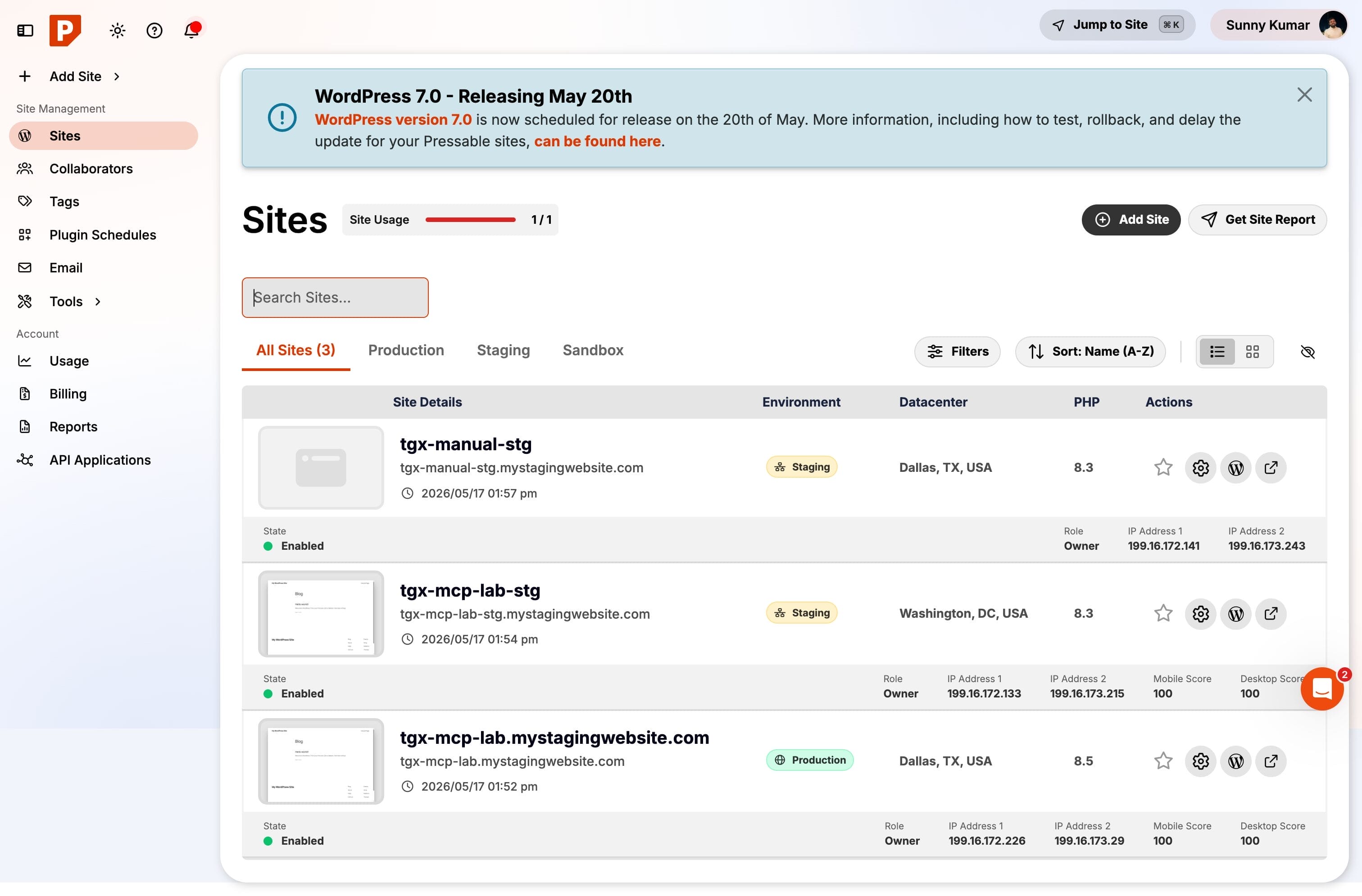
Changing PHP versions: let me be honest, it is a tie
I do not want to oversell this. Bumping PHP from 8.3 to 8.4 through Claude was one line and applied instantly. Doing it in the dashboard — finding the PHP dropdown in the site overview and picking a new version — took me about 27 seconds, and it applied on selection with no confirm step. It is genuinely fast both ways.
For a single setting on a single site, the AI is not dramatically quicker. Where it actually pays off is scale: “set PHP 8.4 on all my staging sites” is one instruction to Claude, versus repeating that dropdown dance once per site in the dashboard. If you run one site, this feature is a nice-to-have. If you run a dozen, it changes your week. I cross-checked the change through MCP afterwards and it correctly reported PHP 8.5 — the two halves agreed, which is a good sign for reliability.
Backups, restores, and reading the error log
Creating an on-demand filesystem backup took about 8 seconds of my time via Claude versus about 22 seconds clicking to the Backups & Restores page and finding the button. The actual backup completed in roughly 60 seconds on the backend either way. Restoring was the same story — one sentence to Claude versus navigating, selecting the backup, and confirming the (correctly) scary “this is irreversible” warning in the dashboard.
Pulling the PHP error log was where the AI route felt genuinely better, not just faster. Claude returned the log as structured, filterable data in about 8 seconds — I can ask “any fatal errors this week?” and get a real answer. The dashboard route meant digging into a nested Logs submenu, about 22 seconds, to land on this page (empty, since it is a fresh site — and the MCP result matched it exactly):

What went wrong (the beta rough edges)
This is public beta and it shows in two places I hit directly. First, the dashboard clone lock I described — the UI stayed blocked for two to three minutes after the clone was actually finished. Annoying, but the MCP side was not affected.
Second, when I asked Claude to clone my Dallas (DFW) production site, the staging clone landed in the Washington DC (DCA) datacenter instead of matching the source. Not a disaster for a staging copy, but if you care about region you should name the datacenter explicitly in your prompt rather than assume it inherits. Neither issue lost data or broke anything — they are the kind of friction you expect from a beta, and worth knowing before you lean on it for production work.
Is Pressable MCP safe to use?
Reasonably, yes, with the usual care. Access is through a token you generate yourself, with an expiry date you choose, and you can revoke it any time from the dashboard. My account also forced two-factor authentication before I could even reach the MCP settings, which I was glad to see. The token is exactly as powerful as your dashboard login, though — anyone holding it can manage your sites — so treat it like a password and do not paste it into random places.
The genuinely destructive actions still behave sensibly. A restore is irreversible and the platform says so plainly; deleting a site is a deliberate action. The AI does what you ask, so be specific — “clone to staging”, not a vague instruction it might interpret against production.
Who is this actually for?
If you run a single site and rarely touch hosting settings, this is a nice convenience but not a reason to switch hosts on its own. If you are a freelancer, agency, or someone like me juggling several WordPress sites and staging copies, it is a real time-saver — the repetitive, multi-site jobs are exactly where typing one instruction beats repeating a click-path. And if you already live inside Claude or an AI tool all day writing or coding, never leaving that window to manage hosting is genuinely pleasant.
Frequently asked questions
Does Pressable MCP cost extra?
No. It is included free on every Pressable plan, including the entry Signature 1 plan, with no add-on fee. You only pay for the hosting plan itself. The MCP connection and the access token are part of the standard account.
Which AI tools does it work with?
Claude Desktop and Claude Code, ChatGPT (browser, via OAuth), and Gemini CLI are the supported clients. Claude Code is the fastest to set up — a single claude mcp add command with your token. Advanced setups exist for tools like Grok and local Llama models too.
Is it actually faster than the dashboard?
For most jobs, yes, on operator effort — creating a site was about four times faster in my test. For a single quick setting it is roughly a tie. The backend provisioning time is identical because it is the same Pressable infrastructure.
Can the AI break my site?
It only does what you ask, so the risk is a vague or wrong instruction, not the AI acting on its own. Destructive actions like restores are irreversible and clearly flagged. Be specific in your prompts and test on staging first, exactly as you would manually.
Is the beta stable enough to rely on?
For everyday site management, it held up well in my testing and nothing lost data. I hit two beta quirks — a post-clone dashboard lock and a datacenter mismatch on a clone. Usable today, but keep your prompts explicit and verify important changes.
Summing Up!
Pressable MCP is the rare “AI feature” that earns its place. It will not change your life if you run one site, but if you manage several WordPress sites it genuinely cuts the boring, repetitive hosting work down to a sentence — and it is free on every plan, so there is no real downside to turning it on. The beta rough edges are minor and the time savings on creating, cloning, and checking sites are real, not marketing.
My honest recommendation: if you are going to try Pressable, go for an annual plan rather than monthly — you get twelve months for the price of ten, which is a far better deal than the rolling monthly I used for this test. You can see Pressable’s plans and the MCP feature here, then connect it to Claude in about two minutes.
If you want more context around this AI-and-WordPress shift, I have also written about how AI is changing website creation in 2026, the exact setup I would use to start a blog on WordPress.com, my hands-on test of 10 plugins on WordPress.com’s $4 plan, and if you want a cheaper starting point first, my verified Hostinger coupon guide.
Would you trust an AI to manage your live hosting, or does that still make you nervous? Tell me where you draw the line in the comments — I am genuinely curious.



