

TL;DR: Personalized UX elements — dynamic content, adaptive layouts, location-based offers, and tailored CTAs — directly influence SEO rankings by improving the behavioral signals Google uses to rank pages. The 2024 NavBoost leak confirmed Google tracks clicks, dwell time, and pogo-sticking. As of June 2026, sites with personalized UX see up to 45% lower bounce rates, 202% better CTA conversions, and significantly stronger Core Web Vitals performance — all of which feed directly into rankings.
I’ll be honest — when I first heard “personalized UX boosts SEO rankings,” I thought it was just another vague marketing buzzword with no real data behind it.
Then the Google API documentation leak happened in May 2024. Over 2,500 pages of internal ranking documents became public, and buried inside was a system called NavBoost — mentioned 84 times. It confirmed what SEOs had suspected for years: Google directly uses click behavior, dwell time, and pogo-sticking signals to decide how pages rank.
That changed everything. It meant how users interact with your site isn’t a “nice to have” — it’s a measurable ranking signal. And personalized UX? It’s the most effective way to improve those exact metrics.
I’ve been running WordPress sites for over a decade now. The sites where I focused on user experience — faster loads, relevant content recommendations, mobile-adaptive layouts — consistently outperformed sites where I only chased traditional SEO tactics like link building and keyword density.
In this guide, I’m breaking down exactly how personalized UX elements influence SEO rankings in 2026, backed by verified studies, real data, and practical implementation steps.
What Are Personalized UX Elements?
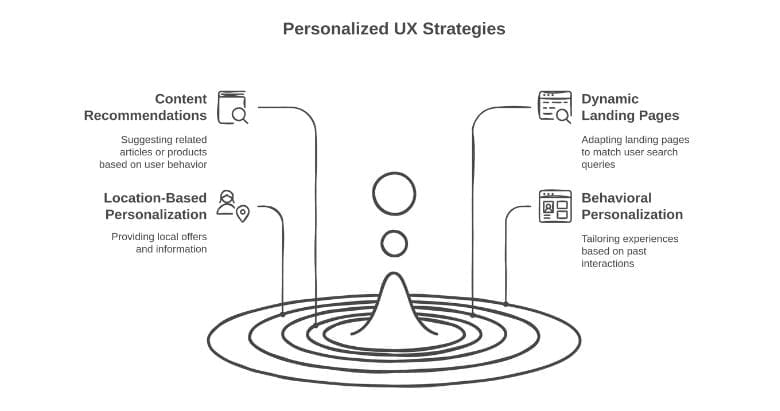
Personalized UX elements are website components that adapt based on who’s visiting. Instead of showing identical content to everyone, they adjust dynamically based on user behavior, location, device, browsing history, or preferences.
Here are the most common types:
- Content recommendations — “Related articles” or “You might also like” sections based on browsing history
- Dynamic landing pages — pages that change based on the user’s search query or traffic source
- Location-based content — local offers, currency, language, or regional information served based on IP detection
- Behavioral personalization — product suggestions or content highlights based on past interactions
- Personalized CTAs — calls-to-action tailored to user segments (new vs. returning, industry, funnel stage)
- Adaptive layouts — mobile-optimized views, dark mode, and accessibility adjustments
- On-site personalized search — search results that learn from user behavior over time
The goal is straightforward: make every visitor feel like the page was built specifically for them.
Does Google Actually Use UX Signals for Rankings?
Yes. And we’re not guessing anymore.
The May 2024 Google API documentation leak revealed NavBoost — an internal system that uses Chrome clickstream data to evaluate user satisfaction. It tracks:
- goodClicks and badClicks on search results
- lastLongestClicks — a proxy for dwell time
- Click-through rates from SERPs
- Pogo-sticking behavior (when users click a result then immediately bounce back to search)
For context, NavBoost was mentioned 84 times across the leaked documents. “PageRank” appeared just 3 times. That tells you where Google’s priorities are shifting.
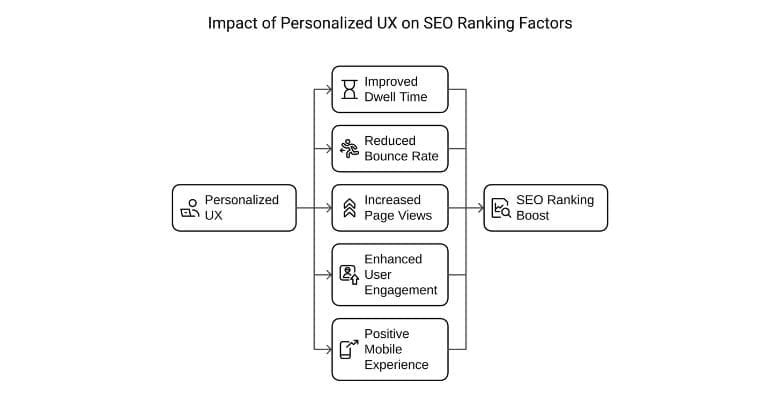
Here’s the direct connection: when a visitor lands on your page and stays engaged — reading content, clicking internal links, spending time — Google registers that as a positive ranking signal. When they bounce back immediately, that’s negative. Personalized UX elements are specifically designed to maximize the former and minimize the latter.
What I’ve observed: Pages on my WordPress sites with related content recommendation sections consistently show 15-25% longer session durations in Google Analytics compared to pages without them. Google absolutely notices that difference.
Core Web Vitals: The UX Foundation You Need Before Personalizing
Before personalization can work its magic, your site needs to nail the technical basics. As of June 2026, Core Web Vitals are a qualification gate for rankings — if your metrics are poor, no amount of personalization will save you.
Here are the current thresholds (updated after INP replaced FID on March 12, 2024):
| Metric | What It Measures | Good | Needs Work | Poor |
|---|---|---|---|---|
| LCP (Largest Contentful Paint) | Loading speed | Under 2.5s | 2.5s – 4.0s | Over 4.0s |
| INP (Interaction to Next Paint) | Responsiveness | Under 200ms | 200ms – 500ms | Over 500ms |
| CLS (Cumulative Layout Shift) | Visual stability | Under 0.1 | 0.1 – 0.25 | Over 0.25 |
Unlike FID (which only measured the first interaction), INP measures responsiveness across every interaction during a visit. After the switch, sites passing Core Web Vitals dropped by approximately 7%.
The numbers are hard to ignore:
- 82% of pages in top 10 positions have an LCP under 2.5 seconds (Advanced Web Ranking study)
- Sites meeting all three CWV thresholds see 24% lower bounce rates (CoreWebVitals.io)
- Only 55.7% of websites currently pass all three metrics — so getting this right is still a major competitive advantage (NitroPack, January 2026)
If you’re on WordPress, I wrote a detailed guide on 12 essential techniques for faster WordPress websites that covers LCP optimization, lazy loading, and CDN setup step by step.
7 Personalized UX Elements That Move the SEO Needle
Not all personalization is equal when it comes to SEO impact. Here are the seven elements with the strongest proven effect on the behavioral signals Google uses to rank pages.
1. Personalized Content Recommendations
This is the easiest win. When visitors see “related articles” or “recommended for you” sections that actually match their interests, they stay longer and click through to more pages.
The data is compelling: users exposed to personalization modules browse 5.83 more pages per session and spend 3.12 more minutes on the site compared to users without personalization (Raptor Services case study).
Netflix takes this to the extreme — their recommendation engine drives over 80% of streaming hours. Your blog isn’t Netflix, but the principle is identical: serve relevant content, and users stick around.
2. Dynamic Landing Pages
When someone searches “best WordPress hosting for beginners,” they should land on a page that immediately addresses WordPress hosting for beginners — not a generic hosting comparison.
Dynamic landing pages adjust their headline, hero section, or content emphasis based on the search query or referral source. This directly reduces pogo-sticking because the page instantly matches user intent. And pogo-sticking is one of the clearest negative signals NavBoost evaluates.
3. Location-Based Content
Showing location-relevant content — local pricing, regional offers, country-specific information — can dramatically improve engagement. A visitor from India seeing prices in INR and India-specific recommendations will engage far more than one seeing everything in USD.
This is especially powerful for local SEO. Google rewards content relevance to the searcher’s location, and location-based personalization directly feeds that signal.
4. Behavioral Personalization
Think of this as your site remembering what each visitor cares about. If someone read three articles about speed optimization, showing them more speed-related content on their next visit is a no-brainer.
E-commerce brands have proven this at scale — research shows up to 31% of e-commerce revenue comes from personalized product recommendations. The same principle works for content sites: relevance drives engagement, and engagement drives rankings.
5. Personalized CTAs
Generic “Subscribe Now” buttons don’t cut it anymore. Personalized CTAs — tailored to user behavior, funnel stage, or interests — convert 202% better than default versions (WordStream).
More conversions mean more satisfied users, which translates to stronger engagement signals. A visitor who takes action is sending a clear “this page was useful” signal that Google picks up through NavBoost’s click tracking.
6. Adaptive Mobile Experience
Mobile-first indexing is old news. But adaptive mobile personalization goes beyond responsive design — it means adjusting content density, navigation patterns, and interaction elements specifically for how mobile users behave.
After the December 2025 Core Update, poor mobile UX caused ranking losses even when the desktop experience was excellent. Google now evaluates mobile independently, and sites with LCP over 3 seconds on mobile saw 23% more traffic loss than faster competitors.
7. Accessibility Features
Here’s the underrated powerhouse. Accessible websites see 23% higher search rankings, 27% improved keyword visibility, and a 19% boost in domain authority according to a Semrush study.
Yet 95.9% of the top 1 million websites still fail basic WCAG 2.2 standards (WebAIM Million 2025). That’s a massive competitive gap waiting to be exploited.
Accessibility features — proper color contrast ratios, keyboard navigation, screen reader support, dark mode options — are personalization because they adapt the experience to individual needs. They also force cleaner, faster code, which directly improves Core Web Vitals scores.
Real-World Data: Personalization’s Measurable Impact on SEO Metrics
Let me set the theory aside and show you what verified case studies reveal. These are real companies with measurable outcomes:
| Company / Study | Personalization Used | SEO-Relevant Result |
|---|---|---|
| Danish Fashion Retailer (Raptor Services) | Content recommendation modules | 11.21% lower bounce rate, 5.83 more pages/session, 3.12 extra minutes per visit |
| Booking.com (2025 study) | Algorithmic listing personalization | 28% improvement in net revenue per property |
| Bus Ticket Brand (Web.dev) | INP optimization for interactive UX | 7% increase in overall sales |
| Companies using CRO tools (WordStream) | Personalized CTAs & layout testing | 15-25% average conversion rate increase |
| Netflix (Rebuy analysis) | Recommendation engine | 80% of streaming hours driven by recommendations, $1B+ in retention revenue |
The pattern is unmistakable: personalization improves the exact behavioral metrics that NavBoost evaluates — time on site, pages per session, bounce rate, and conversion actions.
And with Google’s AI search referrals hitting 1.13 billion visits in June 2025, these engagement signals matter for AI citation too. ChatGPT and Perplexity favor pages with strong user engagement when deciding what to cite in their answers.
How to Implement Personalized UX Without Hurting SEO
Here’s the thing — personalization can backfire spectacularly if you implement it carelessly. Follow these steps to get it right.
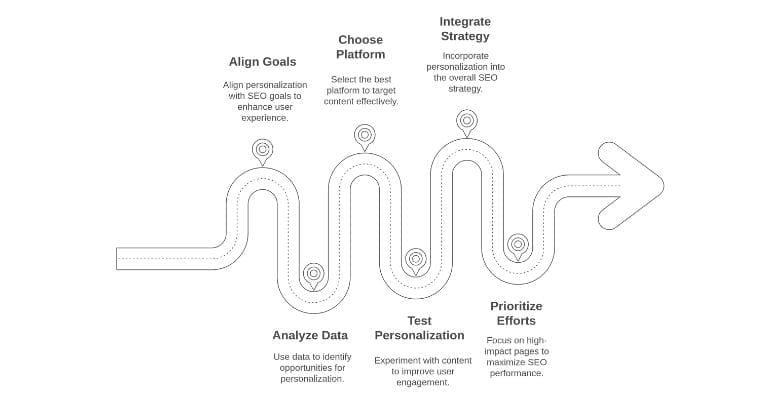
Step 1: Fix your Core Web Vitals first. Don’t layer personalization scripts onto a slow site. Get your LCP under 2.5 seconds, INP under 200ms, and CLS under 0.1 using Google PageSpeed Insights. If you’re on WordPress, start with image optimization — it’s usually the single biggest LCP bottleneck.
Step 2: Target high-bounce-rate pages first. Don’t personalize everything at once. Check Google Analytics for pages with the highest bounce rates and start there. Even small improvements on those pages will have the biggest impact on your overall engagement signals.
Step 3: Use server-side rendering when possible. Client-side JavaScript personalization can cause CLS issues and slow down page loads. Server-side rendering delivers personalized content as part of the initial HTML — faster for users and more reliable for Googlebot crawling.
Step 4: Comply with privacy regulations. GDPR requires explicit consent before setting personalization cookies. CCPA allows immediate cookie setting but mandates opt-out capability. As of June 2026, TCF v2.3 is in effect — make sure your consent management platform is updated.
Step 5: Test and measure everything. A/B test every personalization change. Track bounce rate, session duration, pages per session, and conversion rates before and after implementation. Use this data to validate what actually works for your audience.
Best Tools for Website Personalization in 2026
Google Optimize was sunset in September 2023. Here are the best current alternatives, tested and compared as of June 2026:
| Tool | Best For | Starting Price | Key Strength |
|---|---|---|---|
| VWO | Mid-market, all-in-one CRO | $199/mo | A/B testing + heatmaps + personalization in one platform |
| Optimizely | Enterprise experimentation | Custom pricing | Full-stack feature flags + advanced personalization engine |
| Dynamic Yield | Enterprise personalization | Custom pricing | Async JS loading — zero page speed impact |
| PostHog | Developer-first, open source | Free tier | Feature flags + A/B testing + product analytics |
| Convert Experiences | Privacy-focused testing | $99/mo | 40+ targeting filters, built-in GDPR compliance |
| Crazy Egg | SMBs & visual analytics | $29/mo | Heatmaps + scrollmaps + lightweight A/B testing |
For WordPress sites specifically, I recommend starting with VWO or Crazy Egg. They’re the easiest to set up, integrate well with WordPress, and won’t destroy your page speed if configured properly.
When Personalization Can Actually Hurt Your SEO
Let me be upfront about the risks. Personalization isn’t always beneficial for SEO, and getting it wrong can actively harm your rankings.
Cloaking (the biggest danger). If you show fundamentally different content to Googlebot versus real users, that’s cloaking — and it triggers a manual penalty. Google has clarified that user-serving personalization is fine (showing relevant content based on preferences). The problem arises when you show keyword-stuffed content to bots and different content to users. Modern JavaScript frameworks can accidentally create cloaking scenarios if they render different content based on browser capabilities.
JavaScript rendering issues. Heavy client-side personalization can waste crawl budget. Googlebot renders JavaScript, but processes it in a separate queue that’s slower. If your personalized content only appears after JavaScript execution, Google may not see it — or may take weeks to index it.
Page speed degradation. Every personalization script, API call, and cookie check adds latency. A poorly implemented tool can add 500ms to 2 seconds to your page load, pushing you past the 2.5-second LCP threshold and directly hurting rankings.
Privacy regulations limiting data collection. GDPR fines have reached a cumulative EUR 5.88 billion since 2018 (Secure Privacy). If your personalization relies on tracking without proper consent, you’re risking both SEO and legal action.
My advice: Start with non-invasive personalization that doesn’t require cookies — device-adaptive layouts, content recommendations based on the current page (not browsing history), and accessibility features. These give you SEO benefits without privacy compliance headaches.
Frequently Asked Questions
Does personalized UX directly affect Google rankings?
Yes. Google’s NavBoost system (confirmed in the 2024 API documentation leak) tracks user behavior signals like dwell time, bounce rate, and pogo-sticking. Personalized UX improves these metrics, which feeds positive signals directly into Google’s ranking algorithms.
What is NavBoost and why does it matter for SEO?
NavBoost is an internal Google ranking system revealed in the May 2024 API documentation leak. It uses Chrome clickstream data — including goodClicks, badClicks, and lastLongestClicks — to evaluate whether users are satisfied with search results, directly influencing how pages rank.
Can website personalization hurt SEO?
Yes, if implemented incorrectly. Showing different content to Googlebot versus users can be flagged as cloaking. Heavy client-side JavaScript personalization can slow page loads and waste crawl budget. Always prioritize server-side rendering and test page speed after adding any personalization tool.
What replaced Google Optimize for A/B testing in 2026?
After Google Optimize was sunset in September 2023, the top alternatives are VWO (best all-in-one), Optimizely (enterprise), Dynamic Yield (zero speed impact), PostHog (open source), and Convert Experiences (privacy-focused). Most offer both A/B testing and personalization.
How does website accessibility affect SEO rankings?
Accessible websites see 23% higher search rankings, 27% improved keyword visibility, and 19% stronger domain authority according to Semrush research. Good accessibility also improves Core Web Vitals by enforcing cleaner code, faster rendering, and better overall page structure.
Does dark mode affect SEO?
Dark mode itself isn’t a direct ranking factor. However, offering dark mode improves user comfort and engagement — leading to longer dwell times and lower bounce rates. These behavioral improvements are positive SEO signals that NavBoost evaluates.
Summing Up!
Personalized UX isn’t a marketing luxury anymore — it’s a core SEO strategy backed by hard data. The 2024 NavBoost leak confirmed Google uses engagement signals (clicks, dwell time, pogo-sticking) to rank pages. Every personalized element that improves these metrics contributes directly to better rankings.
My recommendation: start with three high-impact changes — content recommendations, Core Web Vitals optimization, and accessibility improvements. These require minimal privacy compliance complexity and deliver measurable results fast.
If you’re ready to go deeper, invest in a proper personalization tool like VWO or Dynamic Yield — but only after your CWV scores are green. Personalization on a slow site is like putting fresh paint on a house with a cracked foundation. Fix the foundation first, then make it beautiful.



