

TL;DR: Event blogging means creating a WordPress site focused on a time-sensitive event — think Black Friday, New Year, Diwali, or elections — and monetizing the traffic spike through AdSense, affiliate marketing, or sponsored content. With the right niche, 30-40 days of focused work, and solid on-page SEO, a single event blog can earn $500 to $5,000+ during its peak. I’ve done this multiple times, and in this guide, I’ll walk you through every step.
When I first heard about event blogging, I was skeptical. Create a blog around a single event, work on it for a month, and make thousands of dollars? That sounded too good to be true.
But then I tried it. I created a niche blog around an upcoming Indian festival, spent about 30 days writing content and building a few quality backlinks. When the event day arrived, my AdSense dashboard lit up with numbers I’d never seen before on a new site.
That experience changed how I think about blogging. Not everything has to be a long-term, 12-month grind. Sometimes, you can build something focused, time it right, and walk away with a solid paycheck.
In this guide, I’m sharing the exact process I follow — from finding a profitable niche to setting up WordPress, writing content that actually ranks, and monetizing the traffic before the event ends.
What is Event Blogging?
Event blogging is a type of micro-niche blogging where you create content specifically around a time-sensitive event, festival, or occasion. Unlike regular blogging where you build traffic over months and years, event blogging targets a massive spike in search traffic that happens during a short window — sometimes just a few days.
Think of it this way: nobody searches for “Happy New Year wishes” in March. But in late December, millions of people type that exact query into Google. If your blog ranks for those keywords during that window, you can drive tens of thousands of visitors in a matter of hours.
The concept is simple — find an event → create a blog before it happens → rank in Google → monetize the traffic spike → repeat with the next event.
What makes event blogging different from regular blogging:
| Factor | Regular Blogging | Event Blogging |
|---|---|---|
| Timeline | 6-12+ months to see results | 30-40 days of focused work |
| Traffic Pattern | Gradual, steady growth | Massive spike during event window |
| Content Lifespan | Evergreen (years) | Seasonal (annual spikes) |
| Income Pattern | Consistent monthly income | Burst income around event dates |
| Investment | $50-200/year ongoing | $10-50 per event blog |
| Competition | Year-round SEO battle | Intense but short-lived |
The beauty of event blogging is that many events repeat every year. A Diwali blog you create in 2026 can rank again in 2027, 2028, and beyond — with just a content refresh each year. This makes it a semi-passive income source once established.
How Much Can You Earn from Event Blogging?
Let me be upfront: your earnings depend entirely on the niche you pick, the country you target, and how well your content ranks.
Here’s a realistic breakdown based on my experience and publicly shared case studies from the blogging community:
| Traffic Level | Estimated AdSense Earnings | With Affiliate Marketing |
|---|---|---|
| 10K-50K pageviews | $50-$300 | $200-$1,000 |
| 50K-200K pageviews | $300-$1,500 | $1,000-$5,000 |
| 200K-500K pageviews | $1,500-$5,000 | $5,000-$15,000 |
| 500K+ pageviews | $5,000+ | $15,000+ |
According to Productive Blogging’s 2024 income survey, bloggers in the right niches earn an average of $9,169 per month — though event bloggers earn in concentrated bursts rather than steady monthly income.
The key variable is your target audience’s geography. US and UK traffic pays significantly more per click than Indian or Southeast Asian traffic. A Black Friday blog targeting US shoppers with AdSense can earn 5-10x more than a Diwali blog targeting Indian audiences with the same traffic volume.
That said, Indian festival niches like Diwali, Holi, and exam results have much lower competition, making them easier for beginners to rank in.
Step 1: Find a Profitable Event Blogging Niche
This is where most beginners go wrong. They pick a niche that sounds exciting but either has too much competition or too little search volume.
Here’s how I find profitable event blogging niches:
Use Google Trends to Validate Demand
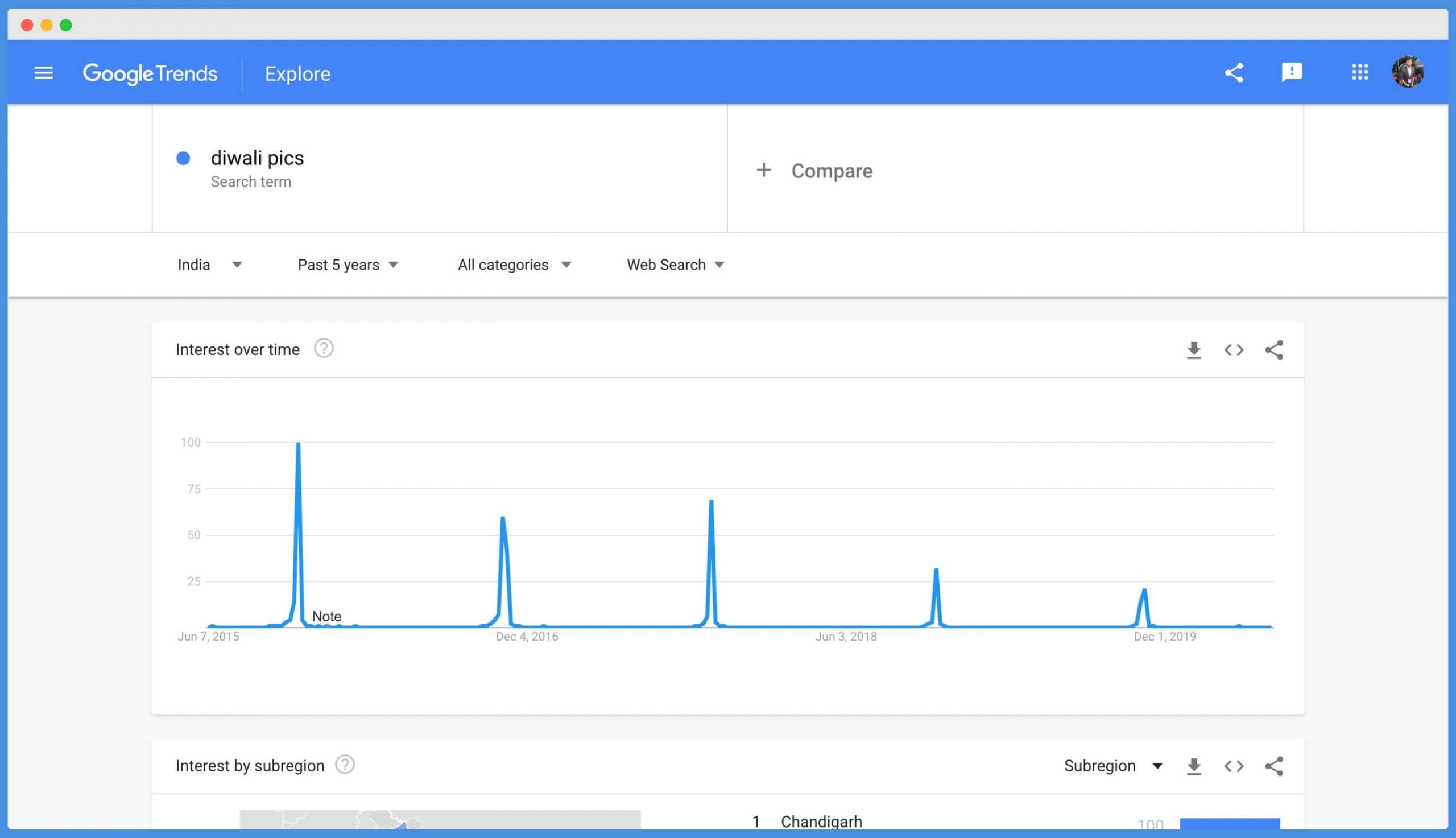
Head to Google Trends and search for your event keyword. You should see a clear, repeating spike pattern — that’s the traffic window you’ll capitalize on.
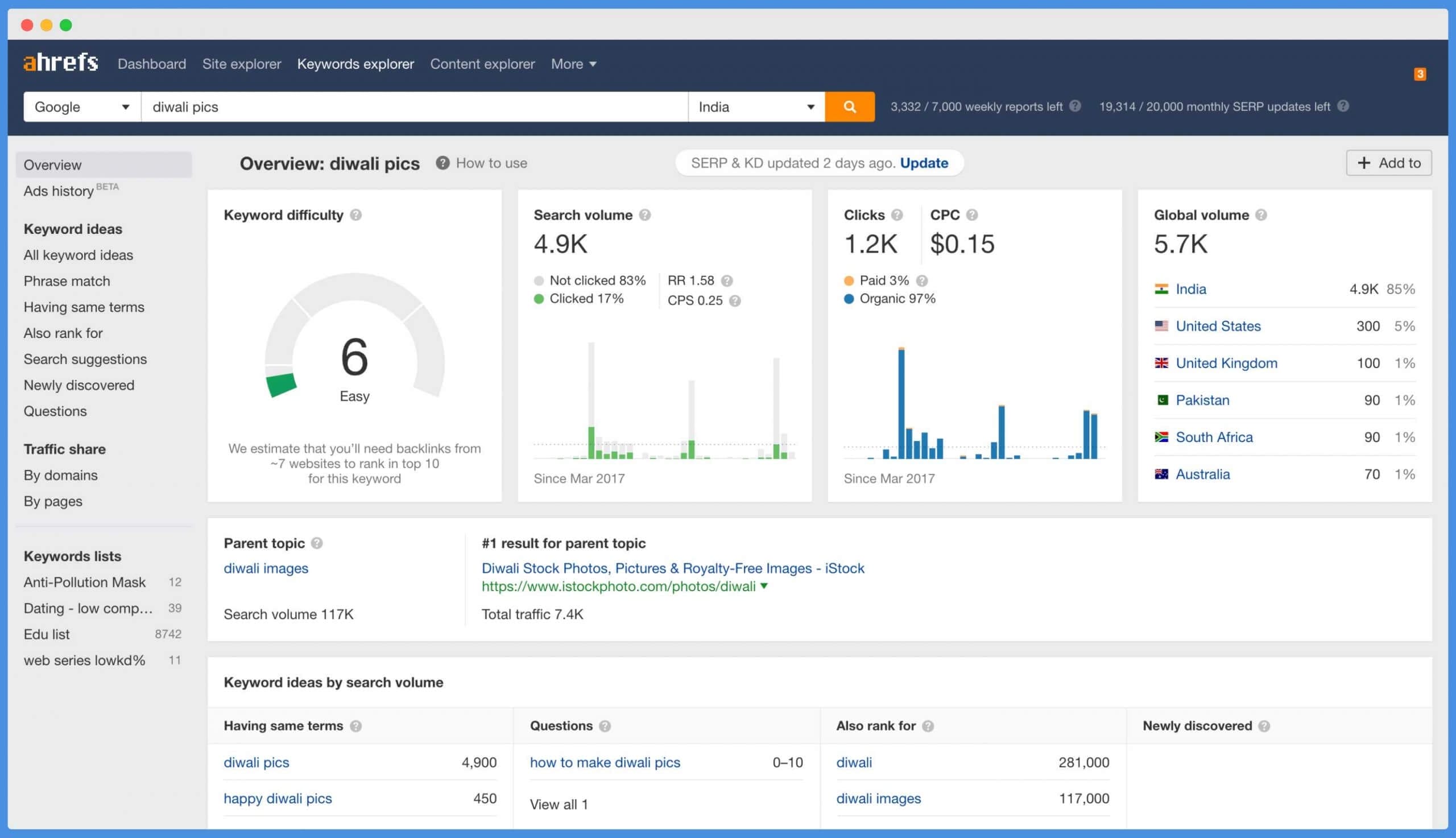
Verify the same keyword in a tool like Ahrefs, Semrush, or any SEO research tool to check the actual search volume and keyword difficulty.
50+ Profitable Event Blogging Topics (Organized by Category)
Here are the event blogging niches I’ve found to be most profitable, organized by category with their approximate traffic potential:
Holidays & Festivals (Highest Volume)
- New Year wishes, images, quotes, captions
- Christmas cards, greetings, gift ideas
- Valentine’s Day messages, gift guides
- Halloween costumes, decoration ideas
- Thanksgiving recipes, messages
- Diwali wishes, rangoli designs, images
- Holi images, celebration ideas
- Eid Mubarak wishes, greetings
- Mother’s Day & Father’s Day messages, gifts
- Easter decorations, egg hunt ideas
Shopping Events (Highest CPC)
- Black Friday deals, coupons, best offers
- Cyber Monday discounts, tech deals
- Amazon Prime Day best deals
- Amazon Great Indian Festival deals
- Flipkart Big Billion Days offers
- Back to school deals, supplies lists
Sports Events
- IPL match predictions, schedule, team rankings
- FIFA World Cup updates, predictions
- Super Bowl predictions, halftime show
- Olympics schedule, medal tally, results
- T20 World Cup match updates
- WWE PPV results, predictions
- NBA Finals, NFL Playoffs
Education & Results
- CBSE, ICSE board exam results
- JEE, NEET exam results and cut-offs
- University admission results
- Government job exam results (SSC, UPSC, Railways)
Entertainment & Awards
- Oscar nominations, predictions, winners
- Grammy Awards results
- Bollywood/Hollywood movie releases, reviews
- Music concert announcements, ticket info
Elections & Government
- Election results, exit polls, predictions
- Budget highlights, tax changes
- Government scheme launches
Pro Tip: Shopping events like Black Friday and Prime Day have the highest CPC (cost per click) because advertisers bid aggressively during these periods. A Black Friday deals blog targeting US traffic can earn 3-5x more per visitor than a festival wishes blog targeting Indian traffic.
You can also use TimeAndDate.com to discover upcoming holidays and events in any country — it’s a goldmine for finding niche event ideas.
Step 2: Choose a Domain Name & Hosting
Picking the Right Domain Name
For event blogging, I strongly recommend using an Exact Match Domain (EMD) — a domain name that exactly matches your target keyword. Despite what some people claim, EMDs still work well for niche event sites because they immediately signal topical relevance to Google.
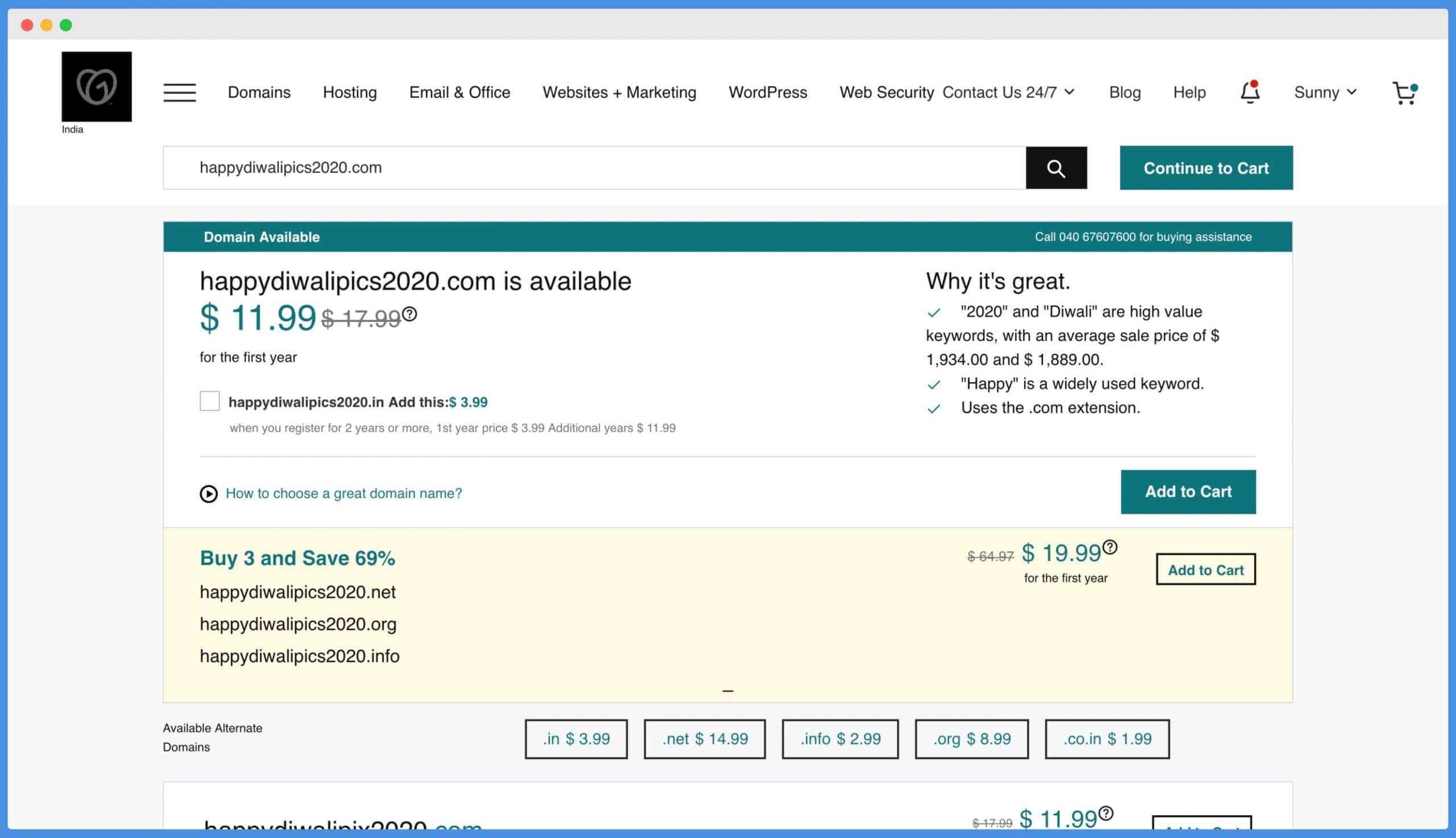
Domain naming tips:
- Try to get the exact keyword as your domain (e.g., happydiwali.com, newyearwishes.com)
- If the exact domain isn’t available, add the year (e.g., happydiwali2026.com)
- Stick to .COM when possible — it carries more trust than newer extensions
- Keep it short and memorable — no hyphens or numbers beyond the year
- Use tools like the Shopify Domain Name Generator for brainstorming ideas
You can get cheap .COM domains from GoDaddy for as low as $0.99, or check out Namecheap where .COM domains start at $6.79 with free WHOIS privacy included.
Choosing the Right Hosting
This is where many beginners mess up badly. They buy the cheapest shared hosting plan and then wonder why their site crashes when they actually start getting traffic on event day.
For event blogging, your hosting must handle sudden traffic spikes — going from 50 visitors per day to 5,000+ visitors per hour without crashing. Regular shared hosting simply can’t do this.
My hosting recommendations for event blogging in 2026:
| Hosting Provider | Starting Price | Best For | Can Handle |
|---|---|---|---|
| DigitalOcean | $4/month | Tech-savvy bloggers | 500-5,000+ concurrent visitors |
| Cloudways | $14/month | Managed cloud hosting | 1,000-10,000+ concurrent visitors |
| Hostinger | $2.99/month | Budget beginners | 300-1,000 concurrent visitors |
| HostArmada | $2.49/month | Speed-focused blogs | 500-2,000 concurrent visitors |
Personally, I use DigitalOcean for my event blogs. With their $4/month droplet and proper WordPress optimization (caching, CDN, image compression), my sites have handled 3,000+ concurrent visitors without breaking a sweat.
DigitalOcean currently offers $200 in free credits for 60 days — which is perfect for event blogging since you typically only need 2-3 months of active hosting before and during the event.
If you’re not comfortable managing a server yourself, Cloudways is a great managed alternative — it runs on DigitalOcean/AWS infrastructure but handles all the server configuration for you.
Step 3: Set Up WordPress for Your Event Blog
Once you have your domain and hosting, the next step is installing WordPress. Most hosting providers offer one-click WordPress installation — if you’re completely new to this, I have a detailed WordPress tutorial for beginners that walks you through the entire process.
After installing WordPress, you need to set up three things: a fast theme, essential plugins, and basic site structure.
Choose a Speed-Optimized Theme
For event blogging, your theme needs to be lightweight and fast. Event day traffic is unforgiving — every extra second of load time costs you visitors and money.
I use GeneratePress on most of my sites, including TheGuideX. It’s the fastest WordPress theme I’ve tested, with clean code and minimal bloat.
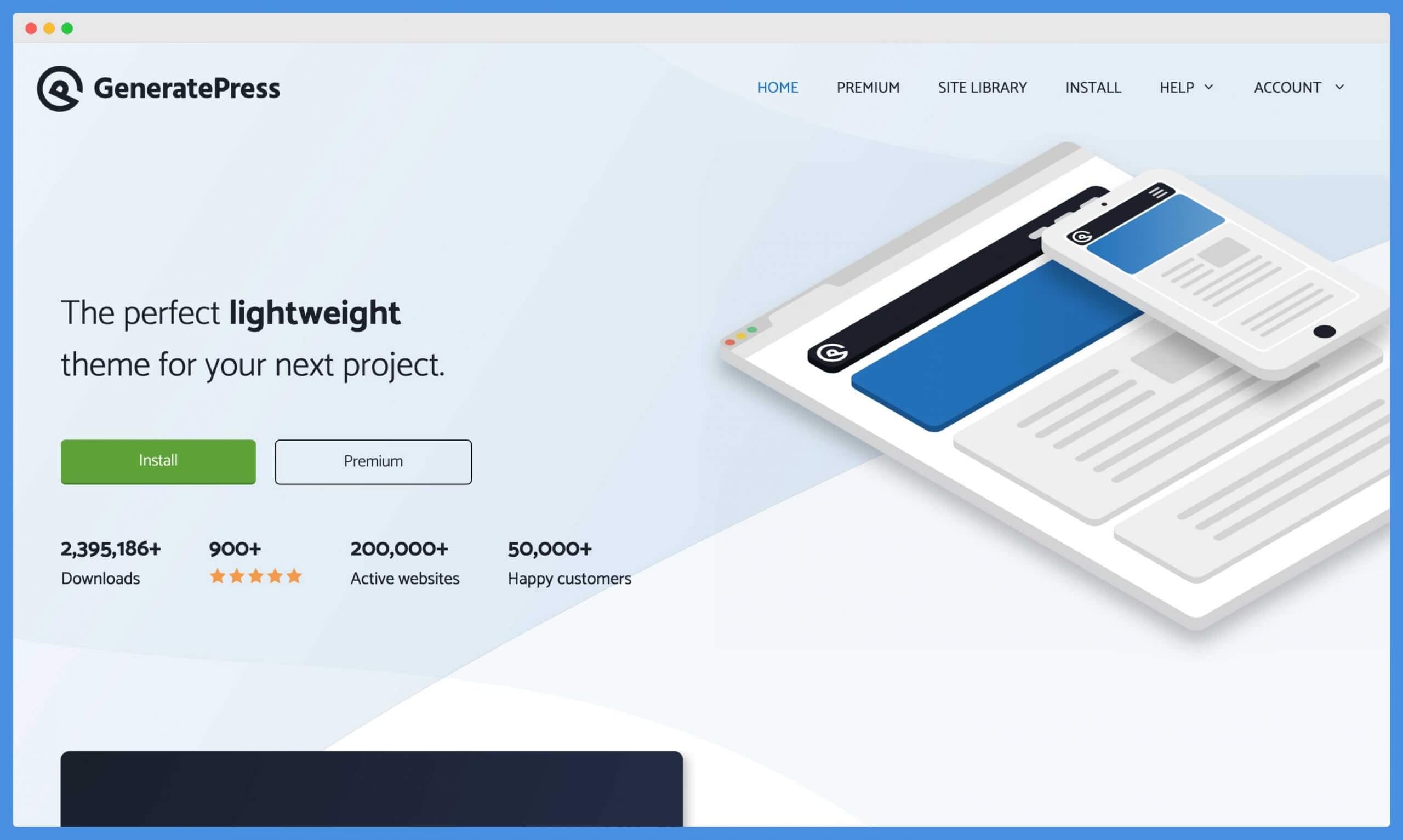
Other solid theme options: Astra (great starter templates), Kadence (free with good performance), and OceanWP (flexible design options). All of these are fast, clean-coded, and well-optimized for SEO.
Install Essential Plugins
Keep your plugin count low — every plugin adds load time. Here are the only plugins you actually need for an event blog:
- Rank Math — free SEO plugin that handles meta tags, schema markup, sitemaps, and image SEO automatically. This is the only SEO plugin you need. Setting up proper SEO from day one is critical.
- WP Rocket (or LiteSpeed Cache) — caching plugin that dramatically improves page speed. This is non-negotiable for handling traffic spikes.
- ShortPixel or TinyPNG — image compression to keep your pages loading fast, especially if you’re using lots of event-related images.
- Cloudflare (free tier) — CDN + DDoS protection. Distributes your content globally so visitors load your site from the nearest server.
That’s it. Four plugins. Don’t install 15 plugins “just in case” — each one slows your site down and increases the chance of something breaking on event day.
Set Up Your Site Structure
For an event blog, I follow a silo structure — organizing content into tight topical clusters. Here’s what a typical event blog structure looks like:
- Homepage — overview of the event with links to all content
- Pillar Post — comprehensive guide (e.g., “Happy Diwali 2026: Wishes, Images, Quotes & Status”)
- Supporting Posts — targeting long-tail keywords (e.g., “Diwali Rangoli Designs 2026,” “Diwali WhatsApp Status,” “Diwali Gift Ideas Under $20”)
- Essential Pages — About, Contact, Privacy Policy, Disclaimer (required for AdSense approval)
Internal link every supporting post back to your pillar post. This tells Google which page is most important and passes link authority to it.
Step 4: Create Content That Actually Ranks
This is where 90% of event bloggers fail. They write thin, generic content and wonder why they can’t outrank established sites.
In 2026, Google’s algorithms are stricter than ever. The June 2025 Core Update and subsequent updates specifically target thin, template-based content. To rank an event blog today, your content needs to be genuinely useful.
Content Strategy That Works
1. Write 15-25 articles before the event. Don’t publish 3 posts and expect to rank. You need enough content to demonstrate topical authority. As of March 2026, Google also requires 15-25 original articles for AdSense approval, so this serves double duty.
2. Target long-tail keywords. Don’t go after “Diwali” as your primary keyword — it’s too competitive. Instead, target “Diwali wishes in Hindi for WhatsApp” or “Diwali rangoli designs simple and easy.” These longer queries have lower competition and higher intent.
3. Make each article genuinely comprehensive. Write 800-1,500+ words per article. Include original images — take screenshots, create graphics, use real photos. Articles with original images rank better than those with only text or stock photos.
4. Optimize for image search. Event blogging niches like “wishes” and “images” get a massive portion of traffic from Google Image Search. Use descriptive file names (diwali-rangoli-design-2026.jpg, not IMG_4521.jpg), write detailed alt text, and compress images for fast loading.
5. Update dates and content annually. If you created a “Happy New Year 2025” blog last year, update all dates, refresh the content, and re-index it for 2026. Google rewards freshly updated content — according to recent studies, content updated within 30 days gets 3.2x more AI citations.
On-Page SEO Checklist for Event Blogs
Every article you publish should follow this checklist:
- Custom meta title & description — write click-worthy titles with numbers and the year (e.g., “150+ Happy Diwali Wishes 2026: Messages, Quotes & Images”)
- Target keyword in the first 100 words — naturally work your main keyword into the opening paragraph
- Descriptive H2/H3 headings — match actual search queries (use People Also Ask for ideas)
- Optimized images — descriptive alt text, compressed file sizes, WebP format when possible
- Internal links — link every article to 2-3 other articles on your event blog
- Short paragraphs — 2-4 sentences max. Nobody reads walls of text on mobile
- Page speed under 3 seconds — use Google PageSpeed Insights to test. As of 2026, sites with LCP (Largest Contentful Paint) over 3 seconds experience 23% more traffic loss from Google
Step 5: Build Quality Backlinks (Not Spam)
Let me be clear about something: the old event blogging approach of blasting hundreds of spammy comment links and directory submissions no longer works. Google’s August 2025 Spam Update specifically targeted these tactics, and sites using them were penalized or deindexed.
In 2026, you need quality over quantity. Here’s what actually works:
1. Social media signals. Share your content on Pinterest (huge for image-based event content), Facebook groups related to your event niche, Twitter/X, and Reddit. These generate real traffic and indirect ranking signals.
2. Web 2.0 properties. Create supporting content on Medium, LinkedIn articles, and Quora answers that link back to your event blog. These carry genuine authority.
3. Guest posting on relevant blogs. Write one quality guest post on a related blog in your niche. One strong, relevant backlink is worth more than 100 spammy directory links.
4. HARO (Help A Reporter Out). Respond to journalist queries related to your event topic. This can earn you links from high-authority news sites.
5. Pinterest is gold for event blogging. Create eye-catching pins for every article. Event topics like wishes, recipes, decorations, and gift ideas perform exceptionally well on Pinterest — and Pinterest traffic converts well with AdSense.
Important: Don’t build links through spamming. I’ve had event blogs get penalized right before the event because of aggressive, low-quality link building. All that work wasted because Google pushed the site to page 3 the week of the event. Play it clean — you only need a few quality links for a low-competition event niche.
Step 6: Monetize Your Event Blog
This is the fun part — turning all that traffic into actual money. Here are the monetization methods I recommend, ranked by earning potential:
1. Google AdSense (Best for Image/Wishes Niches)
AdSense is still the go-to for event blogging because it works with any traffic volume and any niche. You earn money every time someone views or clicks an ad on your site.
Getting AdSense approval in 2026 requires your site to have 15-25 original articles (800+ words each), essential pages (Privacy Policy, About, Contact), HTTPS enabled, and a domain that’s at least 2-4 weeks old.
Expected earnings: $0.50-$5 per 1,000 pageviews for Indian traffic, $5-$25 per 1,000 pageviews for US/UK traffic.
2. Affiliate Marketing (Best for Shopping/Deal Events)
If your event blog covers shopping events like Black Friday, Prime Day, or Flipkart sales, affiliate marketing can earn significantly more than AdSense. You earn a commission every time someone buys through your link.
Best affiliate programs for event blogging:
- Amazon Associates — 1-10% commission on product sales. Great for “best gifts for Diwali/Christmas” type content
- ShareASale & CJ Affiliate — thousands of merchants with higher commission rates (10-50%)
- Impact — newer network with many tech and SaaS brands offering recurring commissions
- Brand-specific programs — many retailers run their own affiliate programs with special event-day commission bumps
3. Ezoic or Mediavine (Best for High-Traffic Sites)
If your event blog consistently gets 10,000+ monthly sessions, consider switching from AdSense to Ezoic (no traffic minimum) or Mediavine (50,000+ sessions/month). These premium ad networks typically pay 2-5x more than AdSense because they run header bidding auctions.
4. Sponsored Content & Direct Ads
For high-traffic event blogs in shopping niches, brands will sometimes pay for sponsored posts or banner placements. A Black Friday deals blog with 100K+ pageviews can charge $500-$2,000 for a sponsored placement during the event window.
| Monetization Method | Best Event Type | Earning Potential | Difficulty |
|---|---|---|---|
| Google AdSense | Festivals, wishes, images | $0.50-$25 per 1K views | Easy (but approval needed) |
| Affiliate Marketing | Shopping events, deals | $5-$50+ per sale | Medium |
| Ezoic/Mediavine | Any high-traffic niche | 2-5x AdSense rates | Need traffic threshold |
| Sponsored Content | Shopping, tech events | $500-$2,000 per post | Need established traffic |
30-Day Event Blog Launch Timeline
Here’s the exact timeline I follow when launching a new event blog. Start this process at least 30-40 days before the event:
| Day | Task |
|---|---|
| Day 1-2 | Niche research, keyword research, buy domain + hosting, install WordPress |
| Day 3-5 | Install theme (GeneratePress/Astra), set up plugins, create essential pages (About, Contact, Privacy Policy, Disclaimer) |
| Day 5-15 | Write and publish 15-20 articles (focus on long-tail keywords), optimize images |
| Day 15-20 | Apply for Google AdSense, set up internal linking structure, submit sitemap to Google Search Console |
| Day 20-25 | Build 5-10 quality backlinks (social media, Web 2.0, one guest post), share on Pinterest |
| Day 25-30 | Write 5-8 more articles, refresh existing content with new keywords from Search Console data |
| Event Day | Monitor traffic, ensure site is stable, engage on social media, publish real-time updates if applicable |
| After Event | Analyze what worked, save the site for next year’s refresh, plan the next event |
Common Mistakes to Avoid
I’ve made most of these mistakes myself, so learn from my experience:
1. Starting too late. If you begin building your event blog 5 days before the event, you won’t rank. Google needs time to crawl, index, and trust your content. Give yourself at least 30 days.
2. Choosing a cheap, unreliable host. Your site crashing on event day is the worst possible outcome. I’ve lost hundreds of dollars because a $1/month hosting plan couldn’t handle 2,000 concurrent visitors. Invest in proper hosting — it pays for itself many times over.
3. Writing thin, AI-generated content. Google’s recent algorithm updates specifically target AI-generated content that lacks human oversight and originality. Write from personal experience, add unique insights, and include original images.
4. Spamming backlinks. One quality backlink from a relevant site beats 500 directory submissions. I’ve had blogs penalized right before event day because of aggressive link building. Not worth the risk.
5. Ignoring mobile optimization. Over 70% of event-related searches happen on mobile. If your site doesn’t load perfectly on phones, you’re losing most of your potential traffic.
6. Not applying for AdSense early enough. AdSense approval can take 1-2 weeks. Apply as soon as you have 15+ articles and essential pages set up — don’t wait until event day.
Frequently Asked Questions
Is event blogging still profitable in 2026?
Yes, event blogging is still profitable in 2026, but the approach has changed. You can no longer get away with thin content and spammy backlinks. Google’s recent algorithm updates reward original, comprehensive content with genuine expertise. Focus on quality over quantity, target the right niches, and you can still earn $500 to $5,000+ per event.
How much money can I make from a single event blog?
Earnings vary widely based on your niche, target country, and traffic volume. An event blog targeting US audiences (Black Friday, Super Bowl) can earn $1,000-$10,000+ per event. Blogs targeting Indian audiences (Diwali, Holi) typically earn $100-$2,000 per event due to lower CPC rates. Shopping event niches with affiliate marketing earn the most.
How long before an event should I start building my blog?
Start at least 30-40 days before the event. You need time to write 15-25 articles, get them indexed by Google, build a few quality backlinks, and apply for AdSense approval (which takes 1-2 weeks). Starting earlier gives you a bigger advantage — some competitive niches benefit from 60-90 days of preparation.
Do I need coding skills to create an event blog?
No coding skills needed. WordPress handles everything — from installing themes to publishing content. You just need to buy a domain, choose a hosting plan, install WordPress (one-click process on most hosts), pick a theme like GeneratePress or Astra, and start writing. The entire technical setup takes about 30 minutes.
Can I reuse an event blog for the next year?
Absolutely — this is one of the best things about event blogging. A Diwali blog from 2026 can be refreshed and reused for 2027. Update all dates, refresh the content with new information, add new images, and re-submit to Google Search Console. Returning event blogs often rank faster in subsequent years because they already have domain authority and indexed pages.
Which is better for event blogging: AdSense or affiliate marketing?
It depends on your event niche. For wishes, images, and festival content — AdSense is better because visitors aren’t in a buying mood. For shopping events like Black Friday, Prime Day, and Cyber Monday — affiliate marketing earns significantly more because visitors are actively looking to buy. Ideally, use both together for maximum revenue.
Summing Up!
Event blogging remains one of the fastest ways to earn money online in 2026 — but the playbook has changed. You can’t rely on thin content and spammy backlinks anymore. What works now is choosing the right niche, creating genuinely useful content, building a fast WordPress site that can handle traffic spikes, and monetizing through AdSense or affiliate marketing based on your niche type.
If you’re just starting out, pick a low-competition festival niche (think Mother’s Day wishes or regional holiday content), follow the 30-day timeline in this guide, and treat your first event blog as a learning experience. Even if it earns just $100-$200, you’ll learn the entire process — and your second event blog will do much better.
Have you tried event blogging before? I’d love to hear about your experience — share your results or questions in the comments below!



