Payment Links Explained: How to Send, Share and Get Paid
A payment link opens a ready-made checkout with the amount filled in. How to send one, where to share it safely, and how to prepare for disputes.

On this page
- What Payment Links Are and Who Uses Them
- How Customers Pay Through a Payment Link
- Where Businesses Can Share Payment Links
- Creating One Link for Services, Products and Live Sessions With AmaJova
- Security and Dispute Risks Before You Send a Link
- Choosing a Payment Provider for Payment Links
- Setting Up a Link and Measuring Whether It Converts
- Confirm Your Provider and Send a Test Link
The invoice went out nine days ago. The client said they'd pay that week, and you've since sent one polite reminder and drafted a second. What you don't know is whether they opened the PDF, whether your account number looked wrong to them, or whether the whole email landed in a folder they never check.
That gap between finishing work and seeing money is where payment links earn their place. Instead of asking a customer to find bank details, open a banking app and type a reference by hand, you send one address. They tap it, see your business name and the exact amount, and pay with a card, a wallet or a local transfer.
This guide walks through what a payment link is, how the customer experiences it, where to share one safely, and the setup and dispute work that most beginner guides leave out.
What Payment Links Are and Who Uses Them
Think about the last time someone asked you to pay by bank transfer. They gave you an account number, a sort code, a reference and a total, and you spent the next two minutes hoping you'd typed all four correctly. A payment link takes that friction away. It's a web address that opens a ready-made checkout page with the amount, currency and description already filled in, so the customer confirms and pays without visiting a store or re-entering details you've both agreed on.
Every link you send has three visible parts. The link itself is the short address you paste into a message. The hosted payment page is what opens when the customer taps it, and it belongs to your payment provider rather than to you. The receipt is the confirmation page plus the email that follows, and it's the customer's proof of payment.
Who uses payment links
- Freelancers invoicing by email: a designer sends a link for a finished project instead of an attachment the client has to interpret.
- Tutors and coaches taking a deposit: a booking is confirmed only when the link clears, which settles the "I'll pay you later" problem early.
- Small shops selling one product from a social post: a single link under a photo replaces a whole catalogue page.
- Charities collecting at an event: a QR code on a table card does the work of a cash box.
None of them need a product catalogue, a shopping cart or customer accounts. A full online store earns its complexity when you sell many items, track stock and manage repeat buyers. A payment link earns its simplicity when you sell one thing to one person at an agreed price.
Two versions you'll meet
A reusable link stays live and can be paid by anyone, which suits a fixed-price product or a standard deposit. A one-time link is tied to a single invoice or order and expires after use or after a set date. Providers such as Stripe and Calendly both build links this way, and the choice you make at creation time decides how much protection you have later.
The commercial shift behind all this is measurable. The global payment-link market was valued at USD 18.4 billion in 2024, according to Growth Market Reports' 2025 market research report. Meanwhile, online payments reached 21% of euro-area consumers' day-to-day payment transactions in 2024, up from 17% in 2022, per the European Central Bank's 2024 consumer payment attitudes study.
Here's the test to apply. If you want to collect one specific payment without building a website, a payment link is the right tool. If you need a stocked catalogue with variants and shipping rules, it isn't. Sellers of downloads sit somewhere in between, and our roundup of the best platforms to sell digital products covers the checkout options that work with the same link model.
How Customers Pay Through a Payment Link
The customer's side of a payment link is short, and that's the point. Six things happen between the tap and the money landing, and each one has a predictable place where beginners lose a sale.
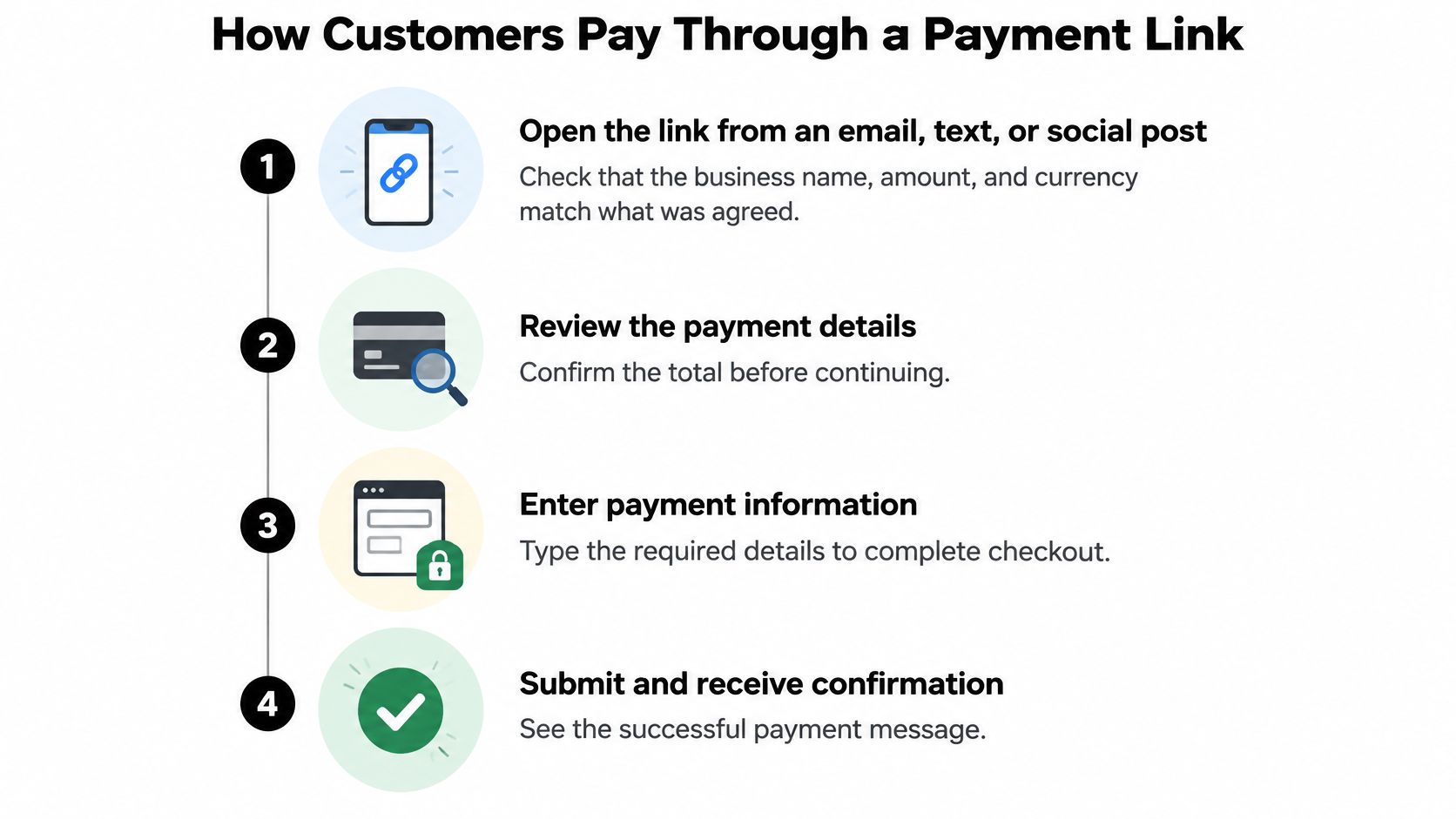
- Open the link and check the basics. The page should show your business name, the amount and the currency, all matching what was discussed. The common stumble is a mismatch: the customer agreed to 300 and the page says 350, so they stop and message you instead of paying.
- Review the order summary. Here, the item, any tax and the final total appear together. Buyers abandon when tax or a service fee appears only at the last step, because the price they mentally agreed to has changed.
- Choose a payment method. Depending on the provider, that's a card, a digital wallet or a bank transfer. The stumble is a missing option, usually the local method a buyer in another country uses, and there's no workaround at that point.
- Enter payment details and confirm. Most banks now ask for a one-time code or an in-app approval before releasing the money. Declines here usually mean the bank flagged an unfamiliar merchant or a cross-border charge, not that the customer is short of funds.
- Read the confirmation page. A reference number should appear on screen. Customers often close the tab before noting it down, which is why you keep the same reference in your dashboard.
- Check the receipt email. This is the buyer's proof of payment, and it's also where disputes are won or lost. Receipts land in spam when the sender name is unfamiliar, so tell customers in advance what name will appear.
What you see on your side
The payment appears in your provider's dashboard with a status attached. Paid is obvious. Pending or processing means the bank authorised the charge but the funds haven't settled, so for anything expensive or custom-made it's worth holding delivery until the status changes. Failed means the customer needs a retry, and a short message with the same link usually fixes it faster than a phone call.
The rail underneath the checkout page
A payment link doesn't invent a new way to move money. It routes the customer into one that already exists. The scale of that routing is visible in the data: the Central Bank of Nigeria's e-payment statistics record 11.6 billion internet or web transfers in the first half of 2024, roughly 51.9% of all reported electronic payment volume in the period. That's the ecosystem your link plugs into.
What you control is the clarity of the page and the speed of your own confirmation. Everything else is infrastructure you're borrowing.
Where Businesses Can Share Payment Links
The more public the channel, the more you need a link that can't be reused, repriced or passed on.
That single rule covers most of the decisions below. The table compares six common channels, what each is good for, and the risk the seller carries on each one.
| Channel | Best for | Main risk to manage |
|---|---|---|
| Email to a client | Invoices and one-off services | Forwarded messages can reach the wrong inbox; confirm the amount in the email body |
| Text or messaging app | Quick payments from known contacts | Easy to impersonate; confirm the request through a second channel |
| Social media post or direct message | Selling a product or booking a session | Public links get copied; use a one-time link for private payments |
| Website button or embedded link | Fixed-price products and service pages | Price on the page must match the link; update both together |
| QR code on printed material | Events, menus and printed invoices | Printed codes can be covered with a fake sticker; check the destination |
| Invoice or quote document | Formal billing with a due date | Link expiry must match the due date or the customer may pay late on an expired link |
The pattern underneath the table is about who can reach the link, not how the link is built. A message to a known contact can still be forwarded to somebody else. A public post can be copied and reposted with a different amount attached. Both are normal, and both are manageable with a few habits.
Habits that prevent most problems
- Put the amount, currency and a reference in the message. The customer can then match what they see on the page against what you both agreed, which kills the "is this right?" pause.
- Never post a link built for one private invoice. If the amount belongs to a specific client, the link belongs in a private message to that client.
- Keep the page price and the link price identical. Change one, change the other immediately, or you create a dispute you'll lose on evidence.
- Scan your own QR code after printing. A printed code is a sticker on paper, so a second sticker can cover it. Test the destination on the morning of an event, not the night before.
Why this matters more than it used to
Remote payment is where the volume is going. The Central Bank of Ireland's payments statistics show online payment volume rising 18.1% to 153.77 million transactions in 2025, with value up 35.5% to €27.98 billion. Point-of-sale volume grew far more slowly in the same period.
Share links through email campaigns rather than one-to-one messages and the channel itself becomes a variable. Our guide to creating an email newsletter covers the list hygiene and formatting that keep those messages out of spam filters.
Before you post any link, ask one question. If a stranger could open it, pay a different amount and later dispute the charge, it should have been a one-time link.
Creating One Link for Services, Products and Live Sessions With AmaJova
A bare payment link carries an amount and very little else. Once you're selling a service with a scope, a physical item that needs a delivery address, or a live session with a date, the link also has to carry expectations. AmaJova payment links are built around that gap: each one opens an OfferLink page that states what's being sold, what's included, the price, and exactly how fulfilment or booking works.
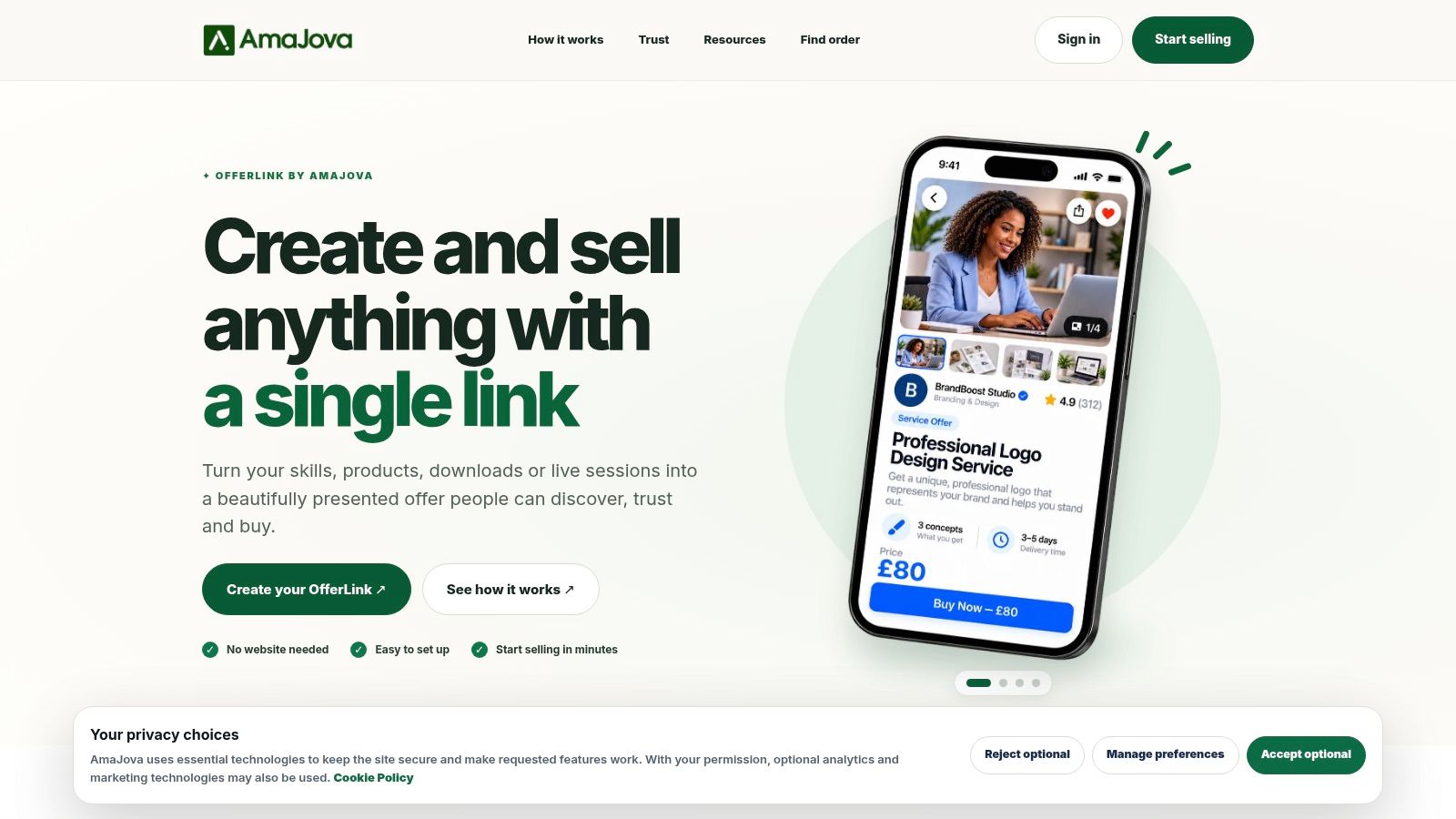
The mechanics that matter for a beginner:
- Offer types that match real work: services, physical products, digital products and live sessions each get their own page structure with title, description, inclusions, price and fulfilment details.
- A hosted checkout with a readable summary: the order page shows what's being bought and discloses an optional Buyer Service Fee where one applies, so the total is never a surprise.
- One order record instead of scattered chats: messages, delivery or access steps, timeline, payment record, dispute status and completion all sit against the same transaction.
- Trust signals built into the page: seller verification, buyer and seller protection information, and clear reporting routes.
- Cross-border selling in 150+ currencies, with payout clearance timelines that vary by seller level and offer type.
- A Seller Growth Program with progression tiers and benefits such as verification badges and priority growth placement.
Where this fits well is the seller who works across bios, direct messages, social posts and an existing site, and wants one professional address rather than a storefront to maintain. It also suits anyone whose buyers sit in several countries and who needs the currency and fee story clear before payment. Where it fits less well is a shop running hundreds of SKUs with stock counts, variants and discount rules. That's catalogue work, and a full storefront handles it better. The platform is operated by AMAJOVA LTD, a company registered in England and Wales, with published policies behind the checkout.
Security and Dispute Risks Before You Send a Link
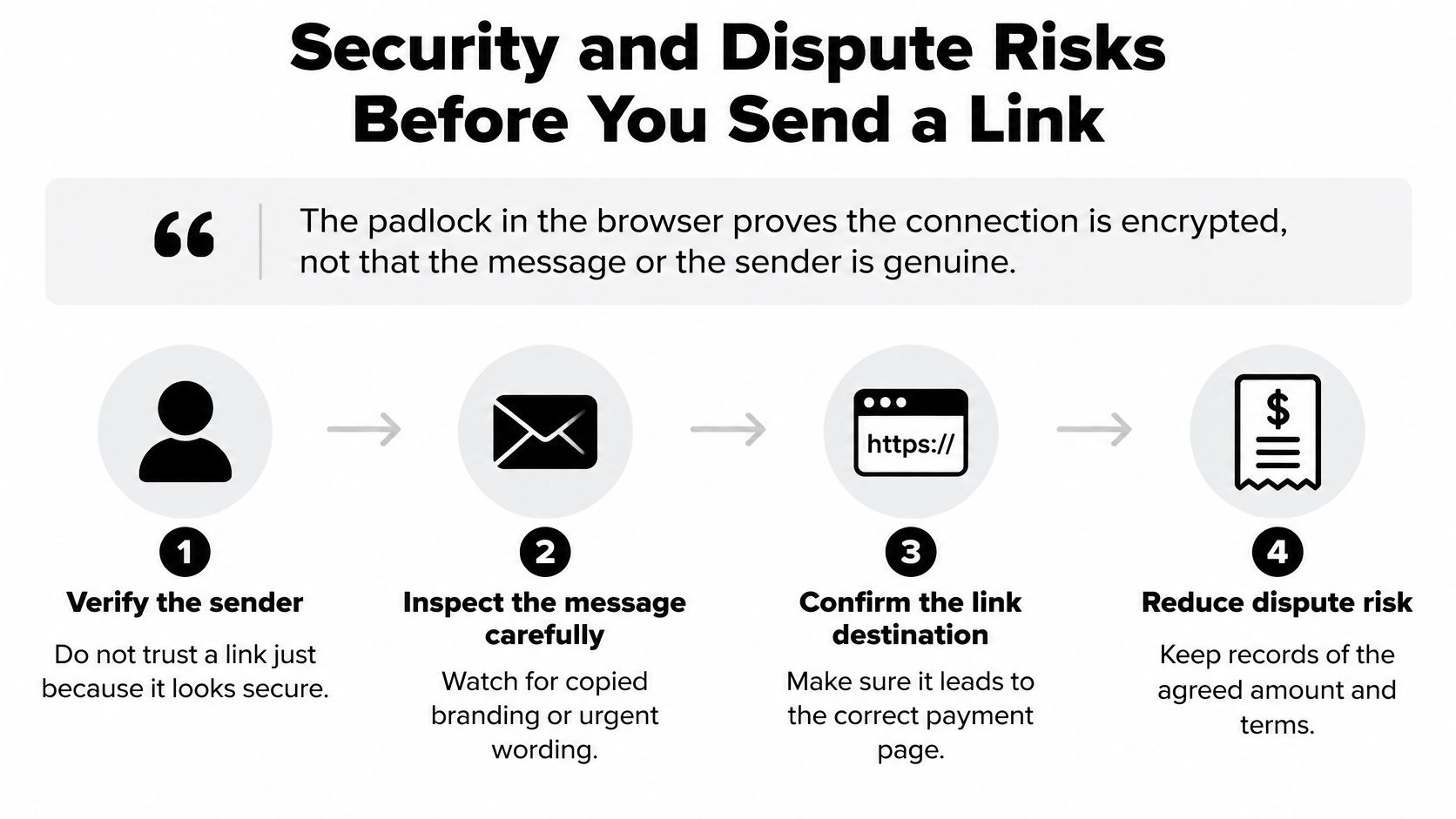
The padlock in the browser proves the connection is encrypted, not that the message or the sender is genuine.
That distinction matters more for payment links than for almost any other purchase route, because a link is trivially easy to forward, copy or imitate. A scammer can lift your branding, swap the destination and circulate the fake before you notice. Separately, merchants face chargebacks, first-party misuse where a customer disputes a purchase they made, and refund requests that turn hostile. The checkout page can be perfectly secure while all of that still lands on you.
So treat verification and dispute preparation as setup work, done before the first link goes out.
Gather the evidence before you send anything
Disputes are won on records, not on tone. Assemble these before the link goes out, not after the complaint arrives.
- Who agreed to pay: full name, email address and, where you have it, a phone number.
- What they're paying for: invoice number, order details and the scope you both accepted.
- That you delivered: delivery records, a service log, session timestamps.
- That recurring charges were consented to: written approval for subscriptions or instalments, kept where you can find it.
- Your refund terms as the customer saw them: the version live at the time of sale, not an edited copy.
- A descriptor they'll recognise: the name that appears on their statement, which is the single biggest cause of "I didn't authorise this" claims.
That last point trips up beginners. A customer who sees an unfamiliar company name on a bank statement files a dispute for a charge they made. If your trading name differs from your brand name, tell the buyer what will appear on their statement before they pay.
Controls that actually reduce exposure
Use one-time links for private invoices, set short expiry periods, authenticate your sending domain where the provider supports it, confirm unusual amounts through a channel the customer already uses, and send a receipt immediately after payment so the transaction is documented on both sides. The receipt does double duty: it gives the customer a record to check against their statement, and it gives you a timestamped artifact if a dispute opens months later.
Keep card data off your own systems. You should handle an order reference and a payment status, nothing more.
The PCI Security Standards Council's guidance on tokenization is clear that PCI DSS applies wherever payment account data is stored, processed or transmitted, and that a properly implemented token can replace the card number so the merchant never holds it. Tokens should be restricted by merchant, channel, device or transaction context, with dynamic cryptograms validated to cut replay risk. A hosted link shrinks your compliance scope, since access control, logging and vulnerability management still apply to anything connected to the payment flow.
Terms, consent records and refund language sit behind every dispute, which is why our guide to legal essentials for digital creators pairs naturally with this section.
Choosing a Payment Provider for Payment Links
Picking a provider works like picking a bank for a market stall. The stall is identical either way, but the bank decides which currencies you can hold, how quickly the takings reach you and who helps when a customer disputes a charge. Two providers can quote the same headline fee and still cost you very different amounts, so compare them on the criteria below.
| Criterion | What to check | Why it matters | Red flag |
|---|---|---|---|
| Transaction fees | Standard rate on the official pricing page | Fees decide margin on small orders | Fees only shown after sign-up |
| Payment methods | Cards, wallets and local methods for your buyers | Buyers abandon when their method is missing | Card-only on a cross-border link |
| Currencies and countries | Supported currencies and where payouts land | Affects foreign buyers' trust and your settlement | Unclear settlement currency |
| Currency conversion | Markup applied to foreign payments | Hidden markup lowers what you receive | Markup not disclosed |
| Payout timing | Days until funds reach your account | Affects cash flow for service businesses | No published schedule |
| Refunds and disputes | Refund destination, dispute tools and evidence upload | Determines your effort after a complaint | No dispute dashboard |
| Hosted checkout and security | Payment page hosted by the provider; domain controls | Keeps card data out of your systems | Asks you to collect card numbers |
| Reporting per link | Campaign tags, conversion data and exports | Lets you see which channel converts | Only total revenue shown |
What international actually asks of you
A link that accepts a foreign card can still convert badly. Cross-border payments depend on compatible payment systems at both ends, the local methods buyers already use, and a clear route for money to travel back when a refund is due. Accepting cards alone rarely covers a foreign market.
Before you sell abroad, work through four checks:
- Countries and settlement currency: which markets the provider supports, and which currency lands in your account.
- Local methods: whether buyers in each market can pay the way they normally do, not just with a card.
- Refund destination and tax evidence: where money goes back to, and what documentation the provider gives you.
- Screening and accessibility: whether sanctions screening applies to your flows, and whether the checkout page works with a screen reader.
Price comparisons deserve the same care as feature ones. TheGuideX's roundups rank tools without any payment for a spot, so the ordering holds whatever a provider charges, and the standard US rates on each official pricing page are the numbers to weigh, because temporary promotions can sit below them.
If you're weighing a hosted link against running checkout inside your own site, our notes on WooCommerce on WordPress.com cover where a hosted page saves work and where it doesn't.
The decision rule is short. If most buyers are local, prioritise local payment methods and payout speed. If buyers are international, prioritise currency handling and refund mechanics. Either way, treat the dispute path as part of the choice itself: before the first link goes out, know where refunds return to, how evidence gets uploaded and how quickly the provider answers when a charge is challenged.
Setting Up a Link and Measuring Whether It Converts
Create the link inside your provider's dashboard rather than building a payment page yourself. That single choice keeps card data on the provider's servers and off yours.
The setup sequence that avoids most rework:
- Pick a hosted link from your provider, not a page assembled from plugins.
- Enter the product name, amount and currency exactly as quoted to the buyer.
- Choose reusable or one-time and set an expiry date that matches your invoice terms.
- Set the business name and statement descriptor so the charge is recognisable later.
- Add a campaign identifier or UTM tag to each version, so every channel can be traced separately.
- Pay the link yourself with a small amount, then check the receipt and the dashboard entry.
- Record results for at least four weeks before drawing conclusions.
The numbers to watch
Measure the funnel rather than the outcome. Track click-through rate, checkout-start rate, authorization rate, completed payments, refund rate and net revenue after fees. A link that gets clicked and abandoned at the payment step has a different problem from one that's never opened, and only the split tells you which.
Here's a walkthrough of the dashboard side before you build your first one.
The test that tells you something
Compare a generic link against a prefilled one that shows local currency, the payment methods buyers in that market use, a mobile-friendly layout and a clear order summary. That comparison is more useful than any published benchmark, because provider figures are product- and experiment-specific. Stripe's conversion optimisation resource, for example, reports that logged-in users saw a 7% or greater conversion lift with its accelerated-checkout product, and that an experiment across more than 150,000 checkout sessions found displaying buy-now-pay-later options produced up to a 14% revenue lift. Useful context, not a promise about your audience.
Segment everything by device, country, traffic source and new versus returning customer. Repeat buyers inflate the apparent performance of any link they've used before. If your buyers book time rather than buy goods, our guide to the local business website and online booking setup on WordPress.com covers where a deposit link slots into a booking flow.
Confirm Your Provider and Send a Test Link
Six steps turn everything above into a decision you can act on today.
- Write down your three must-have features from the provider criteria table, such as local payment methods, one-time links and per-link reporting.
- Shortlist two or three providers and read each official pricing page for standard fees and any currency markup, since promotional rates differ from standard ones.
- Confirm payout timing and refund destination from the provider's own terms rather than from a review.
- Build a small test link using the setup sequence, then run a test refund and check where the money lands.
- Send it to one trusted customer first and ask whether the page was clear, then move to the lowest-risk channel from the channel table.
- Review at thirty days against the metrics you defined, and fix or drop any link or channel that underperforms.
One disclosure worth knowing: some links on TheGuideX's deal, store and review pages earn affiliate commissions, they're marked as such, and they never decide a ranking. Fees still need checking on the provider's own page before you commit.
Start with the smallest possible action. Open a document and write your three must-have features, then check them against two providers' pricing pages before you send a single link to a customer. If you want more walkthroughs like this one, from checkout setup to content planning, TheGuideX's practical guides keep the steps short and the trade-offs visible.
SEO Specialist and product builder with 10+ years in search. The notes come from the work, not the theory.